Most small businesses don't have a brand problem. They have a consistency problem. The logo is fine, but it's stretched on the banner, a different green on the menu, and squeezed into a corner of the invoice. Each one on its own is a small thing. Together they make a business look less established than it is.
A brand guide fixes that. Not the 60-page book big companies commission, but a short set of rules that answers the questions you, your staff, your printer and your designer keep asking.
We just built one for our own studio, so this post uses it as the example.
The short answer
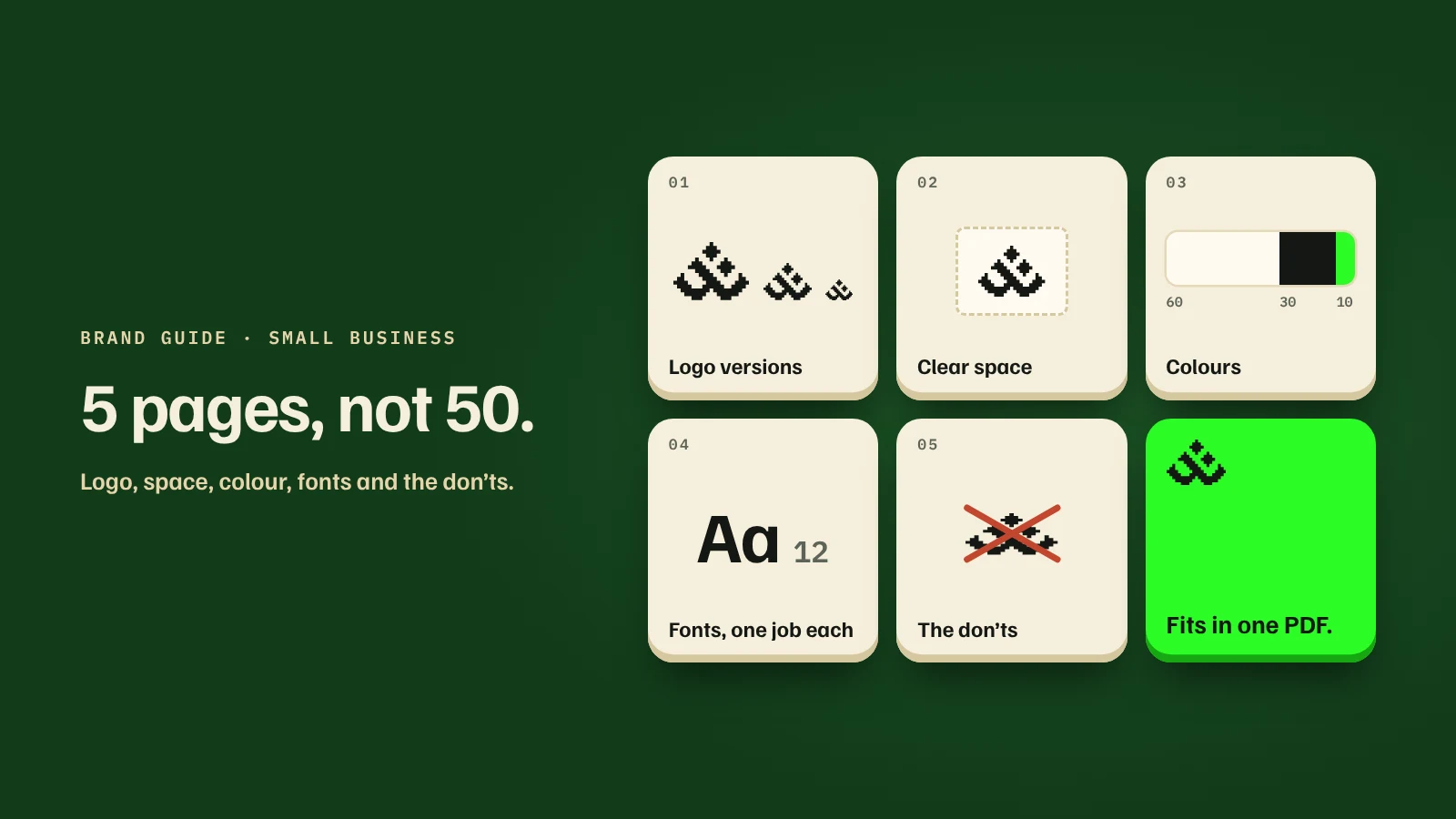
A useful brand guide for a small business covers 5 things:
- Which logo to use, and at what minimum size.
- How much space to leave around it.
- Your colours, with exact codes and how much of each to use.
- Your fonts, and what each one is for.
- A few don'ts, shown as pictures.
If you can fit that on 5 pages, you're done. Everything else is optional.
What a brand guide actually does for you
It makes you look like the same business everywhere. People decide whether to trust you from small signals. When the card, the website and the shopfront all match, you look settled. When they don't, you look new, even if you've been open for 10 years.
It stops the same decisions being made again. Without rules, every new item starts from zero: which logo, which green, which font. With a guide, your staff or your nephew with Canva can make a decent promo post without asking you.
It saves money with suppliers. Printers, sign makers and designers quote faster and redo less when you hand them exact colour codes and a logo file with a minimum size. Most reprints we've seen come from "the green looks different" or "the logo is too small to read".
It keeps your website and your print in step. Your website has its own rules for colour and type. A brand guide makes sure the same rules reach your packaging, uniforms and signage.
1. Logo versions: fewer is better
Most businesses need 3 versions of their logo, not 6:
- Main version, for most uses: letterheads, website header, invoices.
- Compact version, for tight or narrow spaces: ID cards, email signatures, small labels.
- Symbol on its own, for social profile pictures, the browser tab icon, stickers and merch.
For each one, write down the smallest size it can be used at. Below that, step down to the next version. Below the smallest version, write the business name in plain text instead of shrinking the logo until no one can read it.
In our guide, the main logo needs at least 80 mm of width in print. Under that we switch to the compact version, which works down to 28 mm. Under that, it's the symbol alone.
2. Clear space: give it room
Decide how much empty space must surround the logo, and measure it with something taken from the logo itself, so it scales automatically. A common choice is the height of one letter, or one part of the symbol.
We used one square from the pixel grid our logo is drawn on and called it a nuqta, after the dots in Jawi letters. Every spacing rule in our guide is measured in nuqta, so it works at any size without a ruler.
3. Colours: pick 3, and decide the proportions
Give each colour its exact code for screen (hex, like #141814) and a note for print. Then decide how much of each to use. A simple split that works for most brands:
- About 60% a background colour (often white or off-white).
- About 30% a main text colour (often a near-black).
- About 10% your signature colour, kept for the logo and the one thing you want people to notice.
The signature colour stays strong because it's rare. When everything is green, nothing stands out.
The gotcha: check contrast. Bright brand colours often fail as text. Our logo green on our paper colour scores 1.3:1, and readable text needs at least 4.5:1, so we never put green text on a light background. Free contrast checkers will give you the number in seconds.
The print gotcha. Very bright colours, especially neon greens and oranges, can't be printed with normal 4-colour ink. Ask your printer about a spot colour, and always approve a printed proof before a big run.
4. Fonts: one job each
Two or three fonts is plenty. Give each one a job and write it down:
- One for reading: headings, paragraphs, buttons.
- One for numbers and labels, if your business shows a lot of prices or dates. A font with even-width numbers keeps prices lined up.
- One for the logo only, if your logo uses lettering. Don't reuse it for headings, or the name stops looking like a logo.
Add the sizes too: the smallest text size on screen (we use 16 px for paragraphs) and in print.
5. The don'ts, as pictures
People skip rules but notice pictures. Show 6 to 8 common mistakes with a red cross: the logo stretched, recoloured, rotated, outlined, on a busy photo, in a box when it shouldn't be. This page alone prevents most of the problems we see.
Don't forget how to write the name
Decide how your business name is written in sentences. Is it "Kedai Runcit Ali" or "KEDAI RUNCIT ALI"? One word or two? Capitals usually belong to the logo; in text, the name is written normally. It sounds small, but it's one of the first things that drifts.
What to leave out (for now)
You don't need these to start:
- A brand story essay or mission statement page.
- Mood boards and photo style rules, unless you shoot a lot of your own photos.
- Templates for every possible format.
Add them when you actually need them. A 5-page guide people use beats a 50-page guide no one opens.
How to start this week
- Collect every place your logo appears: website, socials, signboard, cards, packaging, invoices.
- Pick the 3 versions you'll keep, and retire the rest.
- Write down the exact colour codes and fonts you're already using most.
- Set a minimum size and a clear space for each logo version.
- Put it all in one PDF and send it to everyone who makes anything for you.
Need a hand?
If your logo exists but the rules don't, we can put together a short brand guide alongside your website, so your site, print and socials start from the same rules. Start with a free website plan or WhatsApp us to ask what it would cover.